
Follow these steps to connect fetchXML Wizard by Stunnware to CRM 2011 beta Online :
1.) Click here to download fetchXML wizard by Stunnware.
2.) Double Click on SwTools icon. It will open the Stunnware Tools for Microsoft Dynamics 4.0
window. Click Connect on the top left. 3.) It will open up a CRM Server Logon , Select https:// from dropdown for Discovery Server
and enter dev.crm.dynamics.com as server Url.
4.) Select online from the next drop down.
5.) Enter the windows live credentials you use to login into your CRM 2011 online.
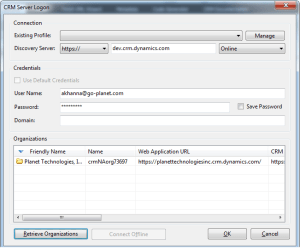
6.) Click on Retrieve Organizations. Your CRM installation/organization will show up in the grid
below. Highlight the Organization name and click on O.K.
7.) Next, it will ask you to save your profile for this login, select any of the option as per your
choice.
8.) Make sure it shows all tabs on top i.e. Tools, fetchXML Wizard, Metadata, Code generator,
CRM Documentation.
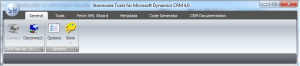
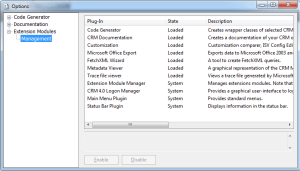
9.) If it does not show these tabs, Click on option in general tab and select Extension
Modules, make sure all the plug-ins are Loaded.
10.) Go to fetch XML Wizard and click on new query. You can design the query in designer
and Execute to see the results.
11.) This query can be used in 2011 BIDS project or for creating custom control for MS CRM.
 Power Platform Pulse
My brother suggested I would possibly like this website.
He was entirely right. This put up actually made my
day. You can not imagine simply how so much time I had spent for this
info! Thank you!
Hi,
Its not working for me for crm 2011 online .
Exception i got when i entered credential and tried to logged in
Exception: Authentication failed for given user name/password (code:0000000)
Detail:
Microsoft.Crm.Passport.PassportException: Authentication failed for the given user name / password (Code: 00000000)
at Microsoft.Crm.Passport.LogonManager.LogonPassport(String policy)
at Microsoft.Crm.Passport.LogonManager.Logon(Guid applicationId, String userName, String password, String partner, String policy, String environment)
at Microsoft.Crm.Passport.LogonManager.Logon(String userName, String password, String partner, String policy, String environment)
at Stunnware.Crm4.CrmConnection.GetPassportTicket(CrmDiscoveryService service, String liveusername, String livepassword)
at Stunnware.Crm4.Forms.CrmDiscoveryServiceLogonForm.worker_DoWork(Object sender, DoWorkEventArgs e)
Hi,
Its not working for me for crm 2011 online .
Exception i got when i entered credential and tried to logged in
Exception: Authentication failed for given user name/password (code:0000000)
Detail:
Microsoft.Crm.Passport.PassportException: Authentication failed for the given user name / password (Code: 00000000)
at Microsoft.Crm.Passport.LogonManager.LogonPassport(String policy)
at Microsoft.Crm.Passport.LogonManager.Logon(Guid applicationId, String userName, String password, String partner, String policy, String environment)
at Microsoft.Crm.Passport.LogonManager.Logon(String userName, String password, String partner, String policy, String environment)
at Stunnware.Crm4.CrmConnection.GetPassportTicket(CrmDiscoveryService service, String liveusername, String livepassword)
at Stunnware.Crm4.Forms.CrmDiscoveryServiceLogonForm.worker_DoWork(Object sender, DoWorkEventArgs e)
Hi ,
Please help me in logging for CRM online o365 account into stunware tools. I have tried with crm online with windows live id account it worked perfectly.
sarath
Hi,
I want to use this tool to connect on office 365.
Window live id not working now for crm after online cloud .
Any suggestion !!
Hi Ashish,
Nice tool buddy. I have found ur tool while searching for fetchxml buider for CRM 2011.
Thanks
Megh
Please provide me the link to download Fetchxml builder/wizard for onpremise crm2011. I am unable to download from stunnware. Thanks in advance!!
kindly try to download from this site. It says this is for CRM 4.0 but works fine with CRM 2011. You can also use advanced find query to create your fetchXML file.
http://www.stunnware.com/products/tools4/download.htm
Hi Sandhya
You can download latest application from http://www.stunnware.com/ on the products page. This tool works perfectly from the CRM server itself. Copy the application to your server and use localhost as the discovery server name.
-Ashish
Hi Ashish,
Is this Stunware tool working with CRM 2011 on-premise
when i tried to connect to my CRM server it is giving some erro details .
Error “System.Net.WebException: The underlying connection was closed: Unable to connect to the remote server. —> System.Net.Sockets.SocketException: An invalid argument was supplied
at System.Net.Sockets.Socket..ctor(AddressFamily addressFamily, SocketType socketType, ProtocolType protocolType)
at System.Net.ServicePoint.GetConnection(PooledStream PooledStream, Object owner, Boolean async, IPAddress& address, Socket& abortSocket, Socket& abortSocket6, Int32 timeout)
at System.Net.PooledStream.Activate(Object owningObject, Boolean async, Int32 timeout, GeneralAsyncDelegate asyncCallback)
at System.Net.Connection.CompleteStartConnection(Boolean async, HttpWebRequest httpWebRequest)
— End of inner exception stack trace —
at System.Net.HttpWebRequest.GetRequestStream(TransportContext& context)
at System.Net.HttpWebRequest.GetRequestStream()
at System.Web.Services.Protocols.SoapHttpClientProtocol.Invoke(String methodName, Object[] parameters)
at Stunnware.Crm4.CrmDiscoveryServiceOnPremise4.CrmDiscoveryService.Execute(Request Request)
at Stunnware.Crm4.Forms.CrmDiscoveryServiceLogonForm.worker_DoWork(Object sender, DoWorkEventArgs e)
”
DO you know any other tool in the market for doing complex fetch xml query ?
Is this working for the CRM 2011 Online 30-day trial setups? I have tried dev.crm.dynamics.com but no Organizations are returned for my live id even though I am a system adminstrator on 3 trials. I tried dev.crm4.dynamics.com as this is where the discovery service is for the trials but I get an error:
“The ticket specified for authentication is invalid”
Janet
The best way to get fetchXML for CRM2011 is using advanced find from within the application. You can download the basic XML and tweak the tags for further manipulations.
Hi Sunny
The easiest way to create a fetchxml is using advanced find in CRM2011. You can also download SWTools from stunnware site on the usefull links page. I recommend using this as it provides you the option to write query in a graphical interface similar to SQL query designer.
Hi Ludger
SWtools are only compatible with CRM4.0 right now and also CRM2011 online. Reason being that swtools supports .net3.5 and CRM2011 is written in .net4.0. They will be releasing a new version which will work well with 2011 on premise.
we’ve made the experience, that, if you run swtools on a server that has CRM 2011 installed, it doesn’t work. (wrong assembly)
From a client, it works.
Cheers,
Ludger
Hi Ashsish, great collection of thoughts around how to get going with custom reports in crm online. I have a quick question for you. How could we convert the SQL Join statements into FETCH equivalent. I have a SQL custom report built for CRM 4.0 on-premise. Now we need to convert the RDL file into FETCH!! Based on my research that FETCH support the LEFT OUTER JOINS, but could you know of any tool that would convert sql into FETCH!! Please fee free to contact me at the above email address.