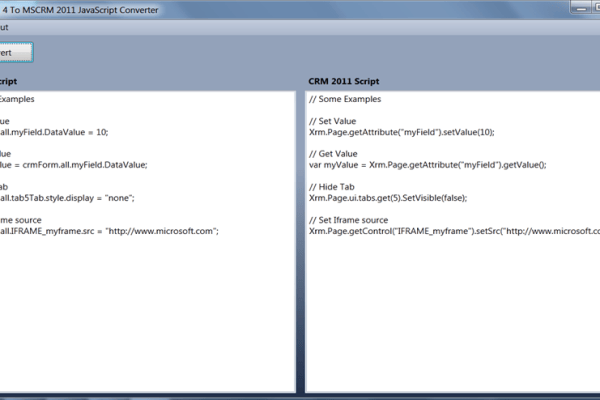
CRM 4 to CRM 2011 JavaScript Converter Tool
Just found CRM 4.0 to CRM 2011 Javascript conversion tool. This could be useful to someone converting large javascript codebase. Thanks to Rhett Clinton
Just found CRM 4.0 to CRM 2011 Javascript conversion tool. This could be useful to someone converting large javascript codebase. Thanks to Rhett Clinton
Just found a very interesting feature added to CRM 2011 Outlook Client. Users can now perform conditional formatting on views while working from their outlook and share them with other users. This can be useful while analysing large amount of data for auditing. This video will demonstrate the feature.
Customer address entity in CRM 2011 stores all the addressed for contacts and accounts. I recently got a requirement to create all address fields on opportunity and a custom entity. Customer also wanted to populate these addresses based on a address lookup similar to the option on quote,order and invoice entity. I wanted to do…
Microsoft has released Update Rollup 3 for Microsoft Dynamics CRM Server 2011 which fixes lot of issues pertaining to overall developer experience as described in Knowledge Base article 2547347 . This updates is available for the following under release 5.0.9688.1244. Microsoft Dynamics CRM 2011 Server Microsoft Dynamics CRM 2011 for Microsoft Office Outlook Microsoft Dynamics CRM 2011 E-mail Router…
I developed a Silverlight App for CRM2011 and deployed the XAP & HTML file as a web resource. While trying to view the HTML page, I got the following error: unhandled Error in Silverlight 2 Application Code: 2103 Category: InitializationError Message: Invalid or malformed application: Check manifest After looking through all posts online including msdn blogs, every…
I was trying to write a mail merge tempelate for incident and noticed that incident does not appear in the list for Associated Entity while creating a template. For all custom entities, mail merge is enable by default but for system entities. If you don’t see the entity name in the dropdown, follow these steps:…
You created a custom view for reports and when you click on this item, Grid throws an error saying input string was not in correct format. You turn on the tracing and find the stack trace as below: System.Number.ParseInt32(String s, NumberStyles style, NumberFormatInfo info) at Microsoft.Crm.Application.Controls.ReportsGridUIProvider.RenderRow at Microsoft.Crm.Application.Controls.AppGridUIProvider.Render at Microsoft.Crm.Application.Components.UI.DataGrid.RenderData …